Changing or Re-seating your scoreboard modem SIM card
Note that most scoring systems are different - some have modems - others have different communications.
If you have been guided to either swap a SIM, or try to re-seat the SIM, then the following is a basic instruction.
This is a "generic" instruction - your modem may be different. Contact Solid if you have any questions.
You will need to contact Solid to discuss the location of your modem (& how to safely access it).
To REPLACE a SIM
Turn off the modem before opening the SIM tray.
Once the SIM is in place, turn on the modem. It may take 2-3 minutes to boot up. The signal lights will light up when ready.
Test your system.
To Re-Seat a SIM
The modem lights should be illuminated showing the signal strength, ie. 4-bars.
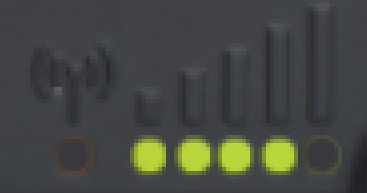
These lights should NOT be flashing. Flashing usually means that there is a fault.
How to clean
1. Remove the SIM as per the above instructions.
2. Wipe the sim contacts with a soft lint-free cloth.
3. Re-insert, bootup & test.
Contact Solid if there are any issues.
Related Articles
Solid Remote Scoring Website is frozen or not updating.
Is your Solid Remote Scoring webpage getting an "Update Failed" error or not updating the scores on your scoreboard? This can be remedied by refreshing your webpage, this will let the device reconnect. You can refresh by clicking the refresh icon (it ...Digit Scoreboards OR Video Screen Scoreboards?
Believe it or not... Digit-based scoreboards are STILL available. Hundreds are sold in Australia every year. Sadly, some are sold to clubs and councils that don’t know the difference. They look at the size and the price. Then buy! Whoops. Comparing ...Can I add speakers to my scoreboard?
Speakers can be added to most scoreboards. Every venue is different in their layout & needs. At Solid we like to discuss your "sound" needs, and then try to back into a good solution. Things to consider: Your Scoreboard location compared to the areas ...Adjusting the Brightness on a Solid scoreboard (outdoor LED screen)
There are TWO main methods to alter the brightness on Solid scoreboards. On bright sunny days, you leave the LED screen on the brightest setting. On dark cloudy days, or for night games, you will want to dim the scoreboard. The scoreboard will be ...Solid's TOP 2 RULES for happy scoreboard owners
Solid's TOP 2 RULES for happy scoreboard life These are THE MOST IMPORTANT TIPS we can give you, following these two rules will help you: - keep your scoreboard working smoothly throughout the season - aid with your stress levels Number 1: TURN YOUR ...